


0.44Mb (10 downloads)
This upload does NOT include any scenery, but only some links to PDF files, such as:
- PROJECT PRESENTATION (The Methuselah Project) PDF
- Ade_178_ITA_R (Airport Design Editor v.1.65 User Manual EN-ITA) PDF
- LibraryCreatorXML_203_TUTORIAL EN-ITA (Library Creator XML 2.0 – EN-ITA manual) PDF
- BGL - TEXTURE (LIBRARY instructions from ADE) PDF
- FILE DI IMMAGINI – THUMBS FILES (Thumbs images for ADE) ZIP
- AVIOSUPERFICI ITALIANE (airfields register) PDF
CREDIT here, to "Simviation portal" for availability to support the diffusion of Flight Simulation applications
Posted Nov 27, 2026 11:20 by Aldo Della Vedova e Gian Mario Verga
4.24Mb (188 downloads)
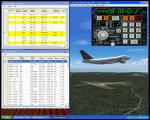
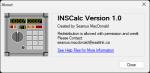
This application provides a basic level of functionality to make using Delco Carousel (and other) INS Systems easier when combined with the default FS2004 and FSX flightplan editor. All waypoints are displayed in their proper order with appropriately rounded coordinates. The program also has the ability to create a list of DME-Update capable VOR stations at any point along the route. This application is compatible with FS9 and FSX, and will run on any system running Windows 98 and later with .NET Framework 2.0. Please view ReadMe and help files.
Created by Seamus MacDonald
Posted Jul 31, 2026 02:28 by Seamus MacDonald
2.22Mb (22353 downloads)
FS2002/FS2004 Aircraft Consistency Check - FSACC v3.5.
Ever wondered why an installed aircraft does not show up in the Select Aircraft dialog, or the sound is missing, or ATC does not call the aircraft correctly? FSACC lists all aircraft folders and checks for each selected folder the aircraft's configuration. Help briefly explains how these things link up. Detlev Schmidtke
Posted Aug 23, 2024 06:50 by John Paul
0.17Mb (216 downloads)
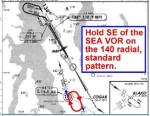
You've read the briefing. You've tried the checkride. Now find out what you need to know to pass it. This document explains the altitudes, the headings, the airspeed, the radio frequencies, the turns, the climbs, the descents, the timers, the "ding" messages--everything the briefing doesn't tell you about the checkride. By Gordon Wood.
Posted Jul 10, 2024 13:06 by Gordon Wood
2.12Mb (311 downloads)
Flight Assistant 2.2 is a program that provides a virtual co-pilot for flight simulation enthusiasts. You can give commands using a microphone which the co-pilot executes then. For example, one could give the command "flaps up", and then the flaps will be raised automatically. Furthermore, the co-pilot responds to your commands, so that you receive a confirmation. The program is nearly fully configurable. You are able to create new commands and even to edit the existing ones. An optional "speak" key lets the PC only recognize commands when you press and hold down a certain key. The program works in combination with Microsoft Flight Simulator 98/2000/2002/2004. By Timm Linder.
Requires Microsoft Speech SDK (SAPI) 5.1, available here:
https://www.microsoft.com/en-us/download/details.aspx?id=10121
Required files:
required file
Posted Jul 6, 2024 09:23 by Timm Linder

0.01Mb (151 downloads)
FS98/FS2000/FS2002/FS2004 AutoSave v1.501. A utility that will save flights ("STN" or "FLT" files) at regular intervals, so you can retry that crashed landing or quickly recover from other problems. By Pete Dowson.
Posted Jul 1, 2024 08:29 by Pete Dowson
2.56Mb (364 downloads)
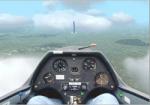
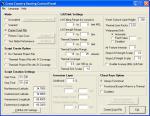
Cross-Country Soaring 2004 v4.0. Would you like more realistic, dynamic thermal and ridge soaring conditions in Microsoft Flight Simulator 2004? Cross-Country Soaring (CCS) was created in 1997 to create more realistic soaring conditions for FS2004 than those included in the sim itself. CCS 2004 Version 4.0 includes significant enhancements, including a graphical user interface and improved thermal cloud support. Package includes a detailed user manual, Cumulus! for FS2004 and some demonstration files. Features: thermal or ridge soar anywhere on Earth, choose randomized or customized conditions, and make it as easy or as challenging as you like. By Eric Carden
Posted Jun 5, 2023 18:45 by Eric Carden

0.06Mb (262 downloads)
FS98/FS2000/FS2002/FS2004 Esound - Extra Sound module, v2.572. A module to cause sounds to be played based on event triggers either from the sim or from EPIC or EPIC95 drivers. By Pete Dowson.
Posted Jul 19, 2022 02:30 by Peter Dowson
0.20Mb (1916 downloads)
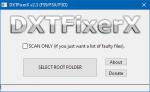
This tool fixes the stutters and slow texture loading caused by dxt3 and dxt5 textures that are missing an active alpha channel. The bug occurs when developers use Imagetool to convert a 32bit bitmap files with a 100% opaque (white) alpha channel to DXT3 or DXT5. This causes stuttering in FS2004 (FS9). It's not as big of a problem in FSX/P3D as they mainly use DDS compression, but it's still good practice to use DXTFixerX here as well, as 3rd party addons might have these faulty textures anyway. This tool simply and quickly scans your installation and fixes any faulty textures. You can also scan for errors without making any changes to any files. Results of the scan will be viewable in a log file. By Peter Nyman (neumanix).
Posted Mar 1, 2021 01:50 by lastivka
0.03Mb (197 downloads)
FS2004 Aircraft.cfg Auto-Renumbering Utility. This small utility will renumber the [fltsim.xx] sections of your aircraft.cfg file when you make modifications or add new liveries. For example, if you add a [fltsim.n] section, instead of renumbering the sections by hand, just run this utility so you no longer have to worry about keeping the numbers straight. Useful for people who do a lot of aircraft.cfg editing, such as AI Traffic enthusiasts. Stand-alone program, no installation required. Works in Windows 10. By Scott Lookabill.
Posted Feb 26, 2021 18:26 by lastivka